How to Repurpose Viral TikToks at Scale: Generate 100 AI Variants in One Run
Learn how to repurpose viral TikToks, Reels, and YouTube Shorts at scale with AI. Bulk-clone any source video into up to 100 on-brand variants in parallel using Sora 2, Veo 3, and Kling 3.

Posted by
 Jet
JetRelated Reading
How to Create an AI Influencer and Make Money in 2026
Complete guide to building profitable AI influencers. Learn how creators earn $3K-$50K/month with ai influencers, brand deals, and content monetization.
How AI ASMR Videos Are Growing YouTube Channels to 150K in 3 Months
Discover how creators like Bella's ASMR grew from 0 to 150K subscribers in just 3 months using AI-generated ASMR videos. Learn the complete strategy for creating viral ASMR content with AI.
Traditional UGC Creation Is Holding Back Your Video Success
UGC-style videos work because they feel real, but traditional creation methods are slow and expensive. Discover how AI-powered video generation creates authentic UGC content in minutes, not weeks.
How to Repurpose Viral TikToks at Scale: Generate 100 AI Variants in One Run
The most reliable content strategy for 2026 is not inventing trends — it is cloning what already works. Viral TikToks, Reels, and YouTube Shorts have proven hooks, proven pacing, and proven audience demand. The bottleneck has never been knowing what to make; it has been the time and cost of making it at scale.
AI has removed that bottleneck. With a bulk video clone workflow, you can paste a list of URLs on Monday morning and have a week of on-brand video variants ready by lunch.
This guide walks through exactly how to do it.
Why Repurposing Beats Creating From Scratch
Before diving into the how, it helps to understand why repurposing viral content works so well from a distribution standpoint.
Demand is already validated. A TikTok with 2 million views proves that a specific hook, format, and topic resonates with a real audience. That is market research you did not have to pay for.
Algorithms amplify familiar patterns. TikTok, Instagram, and YouTube all have classification systems that recognize video formats. A video that structurally resembles high-performing content in your niche gets a head start in distribution.
Iteration beats invention. The fastest-growing content accounts in 2026 are not the most creative. They are the most systematic — testing 20 variations of a winning format instead of launching 20 completely different ideas.
The challenge with repurposing has always been volume. One-by-one editing is too slow to outpace trends. That is where bulk AI cloning changes the math.
What Bulk Video Cloning Actually Does
Bulk video cloning is not a filter or a template. It is a multi-step AI pipeline that:
- Downloads and transcribes the source video — audio, on-screen text, pacing, aspect ratio
- Analyzes the style — visual composition, energy level, hook structure, CTA placement
- Generates a base prompt that captures the essence of the original without copying it
- Produces N independent variants from that prompt, each with its own creative interpretation
The result is a set of videos that feel inspired by the original without being copies. Same emotional hook, different execution.
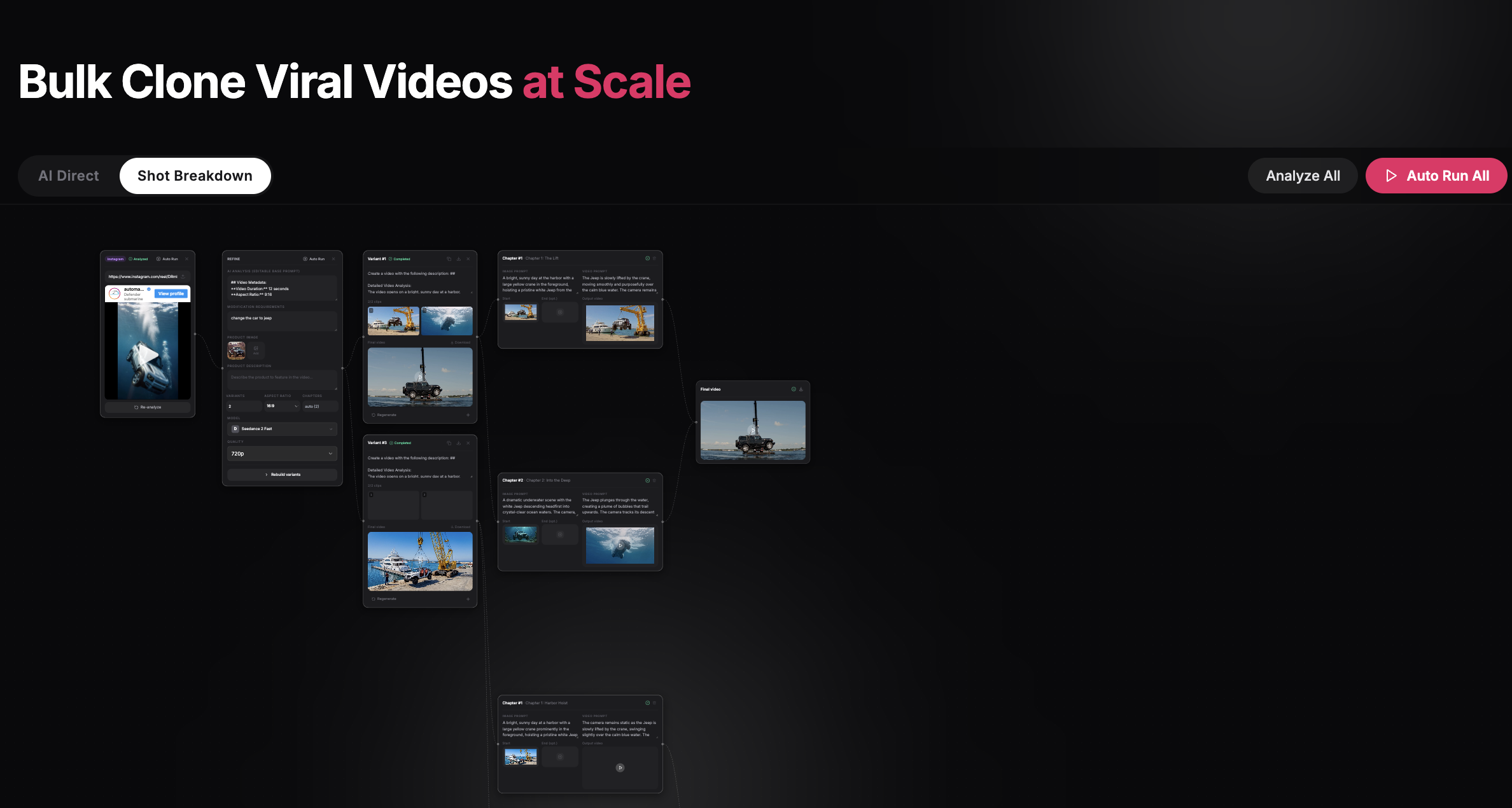
Two Pipelines: Which One to Use
CloneViral's bulk workspace offers two generation modes. Choosing the right one for your content type makes a significant difference in output quality.
AI Direct — Best for Short-Form (5–20 seconds)
AI Direct runs one prompt through a video model and produces a single cinematic clip per variant. It is the fastest pipeline, ideal for:
- TikTok hooks and open loops (5–10 seconds)
- Product reveal shots
- Reaction-style content
- Trend sound overlays
Supported models: Sora 2 (native audio, 9:16 vertical), Veo 3, Kling 3. For UGC-style content, Sora 2 with native audio is the strongest option — it generates synchronized sound without a separate audio layer.
AI Shot Breakdown — Best for Long-Form (30 seconds to 3 minutes)
Shot Breakdown is a chapter-based pipeline that:
- Splits the source narrative into 2–8 chapters
- Generates a start-frame image for each chapter using Nano Banana 2
- Creates a video clip per chapter, chapter by chapter
- Stitches everything into a single final video
Use this pipeline for product explainers, story-driven ads, or any content where narrative continuity matters more than raw speed.
Step-by-Step: Running a Bulk Clone Session
Here is how a complete bulk clone workflow looks in practice.
Step 1: Collect Your Source URLs
Start by identifying 3–10 viral videos in your niche. Look for:
- Videos with 500k+ views in the past 30 days
- Content that matches your brand's tone or audience
- Videos where the core concept (not just the style) is transferable
Paste each URL into a plain text list or a spreadsheet column. You can add all of them at once in the next step.
Step 2: Import Into the Bulk Workspace
Open the Bulk Video Clone workspace and click Add Video. You have two import options:
- Paste URLs directly — one per line, TikTok, YouTube Shorts, and Instagram Reels are auto-detected
- Upload Excel or CSV — paste a column of URLs from your research spreadsheet; the importer extracts every valid URL automatically
Add all your source videos in one shot. You will see a card for each one on the visual canvas.
Step 3: Analyze Each Source Video
Click Analyze All in the toolbar. The AI will:
- Download each video
- Transcribe the audio
- Identify visual style, pacing, and structure
- Generate an editable base prompt for each source
The base prompt is the AI's interpretation of what makes the original work. It is fully editable — you can add product details, change the setting, or adjust the tone before generating variants.
Pro tip: Add a short note in the Modification Requirements field. Something like "change the car to a Jeep" or "add a product shot at 0:04" gives the AI a specific direction without overwriting the core structure.
Step 4: Set Variant Count and Pipeline
For each source video, set:
- Variants: how many independent versions to generate (1–100). For testing, start with 5; for a content calendar, 20–30 is typical.
- Pipeline: AI Direct for clips under 20 seconds, Shot Breakdown for longer content
- Model: Sora 2 is recommended for realistic UGC; Kling 3 for cinematic shots; Veo 3 for motion-heavy content
Step 5: Run Everything in Parallel
Click Auto Run All. The workspace sends all variants from all source videos to the generation queue simultaneously. There is no waiting for one to finish before the next starts.
For a session with 5 source videos × 10 variants each, all 50 generations run in parallel. Progress updates stream live on the canvas. You can enable Run in Background to keep generating after closing the tab.
Step 6: Download and Deploy
When variants complete, download individually or use Download All to batch-export every finished video in one click. Each file is ready for direct upload to TikTok, Instagram, or YouTube — no re-encoding required.
Practical Content Calendar Strategy
Here is how performance marketers and UGC agencies are using bulk cloning to fill content calendars without a production team.
The Monday Batch Method
Every Monday, identify 5 viral videos from the previous week in your niche. Run a bulk session with 10 variants per source (50 total). Review on Tuesday, select the 10–15 strongest outputs, and schedule them across the week. Repeat.
With this cadence, you are always working from validated demand and always testing new creative directions. Over a month, you accumulate 40–60 live variants and enough performance data to know exactly which hooks, styles, and topics convert.
A/B Testing Ad Creative
For paid media, bulk cloning solves the single most expensive problem in performance advertising: creative fatigue. Most brands run 3–5 ad variations. The top-performing accounts in 2026 run 50–100.
The workflow:
- Identify your 2–3 best-performing organic clips
- Clone each into 15–20 variants with different hooks, visual styles, or CTAs
- Launch everything with small daily budgets ($5–10 per variant)
- Pause anything below your target CPC after 72 hours
- Scale the survivors
The cost of generating 50 variants is a fraction of what a single production shoot costs. The ROI difference is measurable within two weeks.
Common Mistakes to Avoid
Cloning without modifying: The base prompt the AI generates is a starting point. Always add at least one modification — a product detail, location change, or tone adjustment — to ensure the output fits your brand rather than just resembling the original.
Using all variants without review: 100 variants does not mean 100 publish-ready videos. Review outputs briefly, cut anything that missed the mark, and deploy the top 60–70%. The AI is consistent but not perfect.
Ignoring the model selection: Sora 2, Veo 3, and Kling 3 have distinct aesthetics. Sora 2 tends toward photorealistic with strong motion; Veo 3 handles fast-paced action well; Kling 3 excels at cinematic composition. Picking the right model for your content type materially improves output quality.
Running everything in one session without testing first: If you are new to bulk cloning, run a 3-video session with 5 variants each before scaling to 10 sources × 50 variants. Get a feel for how the AI interprets prompts and what modifications produce the results you want.
Who Uses Bulk Video Cloning
The workflow is used across several different content production contexts:
UGC creators use it to cover every trending topic in a niche in a single session, producing multiple variations of each trend instead of one post per week.
Dropshippers and DTC brands use it to run mass creative testing on paid social, launching dozens of ad angles in an afternoon instead of booking a production shoot.
Performance marketing agencies use it to scale winning creative for clients without expanding their video editing team. A single editor managing a bulk workspace can produce what previously required a team of four.
Solo content operators building faceless YouTube and TikTok channels use it to maintain daily publishing cadence without manual editing.
Key Takeaways
Repurposing viral content at scale is not a creative shortcut — it is a systematic approach to content production that starts from validated demand instead of guesswork. The mechanics are straightforward:
- Identify what is already winning in your niche
- Use AI to generate multiple creative interpretations grounded in that source material
- Deploy fast, measure faster, and iterate based on real performance data
The bulk clone workflow compresses what used to take a week into an afternoon. The ceiling on volume is no longer production capacity — it is your ability to identify the right source material to clone.
Start with five URLs. See what the AI produces. Then scale from there.
→ Open the Bulk Video Clone workspace — 100 free credits included, no credit card required.
Premium AI Video Generation Experience
We support advanced AI video generation technology for viral content
Start Creating Now