How to Make Your AI Videos Stand Out with Styled Reference Images
Learn how to make professional AI videos using reference images. Step-by-step guide to creating consistent, cinematic videos with Nano Banana through simple chat commands.

Posted by
 Jet
JetRelated Reading
AI Video Agents: Consistency Meets Creative Freedom
AI video agents deliver creative freedom with character consistency. Learn how multi-agent systems automate video production while maintaining brand identity.
How to Create Consistent Character Video using AI in 5 Minutes
Master AI character consistency for video production. Learn practical workflows, character bibles, and prompt techniques to build repeatable personas across Sora 2, Veo 3.1, and modern AI models.
How to Remove Sora 2 Watermarks: Fast and Quality-Preserving Methods for Professional AI Video
Complete guide to removing Sora 2 watermarks while maintaining video quality. Learn legal methods, professional workflows, and how to use CloneViral's watermark-free AI video tools for clean, production-ready content.
After creating hundreds of AI videos, I've discovered something most creators miss: the difference between amateur and professional-looking AI videos isn't about using better AI models. It's about one thing: stylization through reference images.
Here's the truth—AI video generators are powerful, but without visual guidance, they produce generic, inconsistent content. The solution? Teaching AI your exact visual style before you generate anything.
In this guide, I'll show you how to use reference images with Nano Banana to create storyboards that maintain consistent style, then turn those storyboards into professional videos—all through simple chat commands.
Why Your AI Videos Look "Off" (And How to Fix It)
Most AI video creators make the same mistake: they write a prompt and hope for the best. The result? Videos where each scene looks completely different—random colors, inconsistent lighting, characters that change appearance.
The problem: AI doesn't know what "your style" looks like unless you show it.
The solution: Reference images that teach AI exactly what aesthetic you want.
When you provide style references, you're giving AI a visual vocabulary. Instead of random outputs, you get intentional, cohesive content that looks like a professional production.
What Is Nano Banana and How Does It Learn Style?
Nano Banana is CloneViral's image generation engine built on Google's Gemini 3. What makes it special is its ability to analyze reference images and extract visual DNA—the specific color palettes, lighting patterns, textures, and compositional choices that define a style.
How style learning works:
- You upload 1-5 reference images (film stills, artwork, photography)
- Nano Banana analyzes the visual patterns
- When you generate new images, it applies those learned patterns
- Every output maintains your chosen aesthetic
The magic is that you don't need technical knowledge—just chat naturally about what you want, and the AI handles the rest.
Step-by-Step: From Reference Images to Professional Video
Here's my exact workflow for creating stylized AI videos through CloneViral's chat interface.
Step 1: Choose Your Style References
Before generating anything, find 3-5 images that capture your target look. Good sources include:
- Film stills from movies with your desired aesthetic (Blade Runner for cyberpunk, Wes Anderson films for symmetrical pastels)
- Professional photography with specific color grading
- Artwork or illustrations in your target style
- Previous AI generations that hit the mark

Pro tip: Choose images with consistent color temperature. Mixing warm sunset tones with cold blue lighting confuses the style learning.
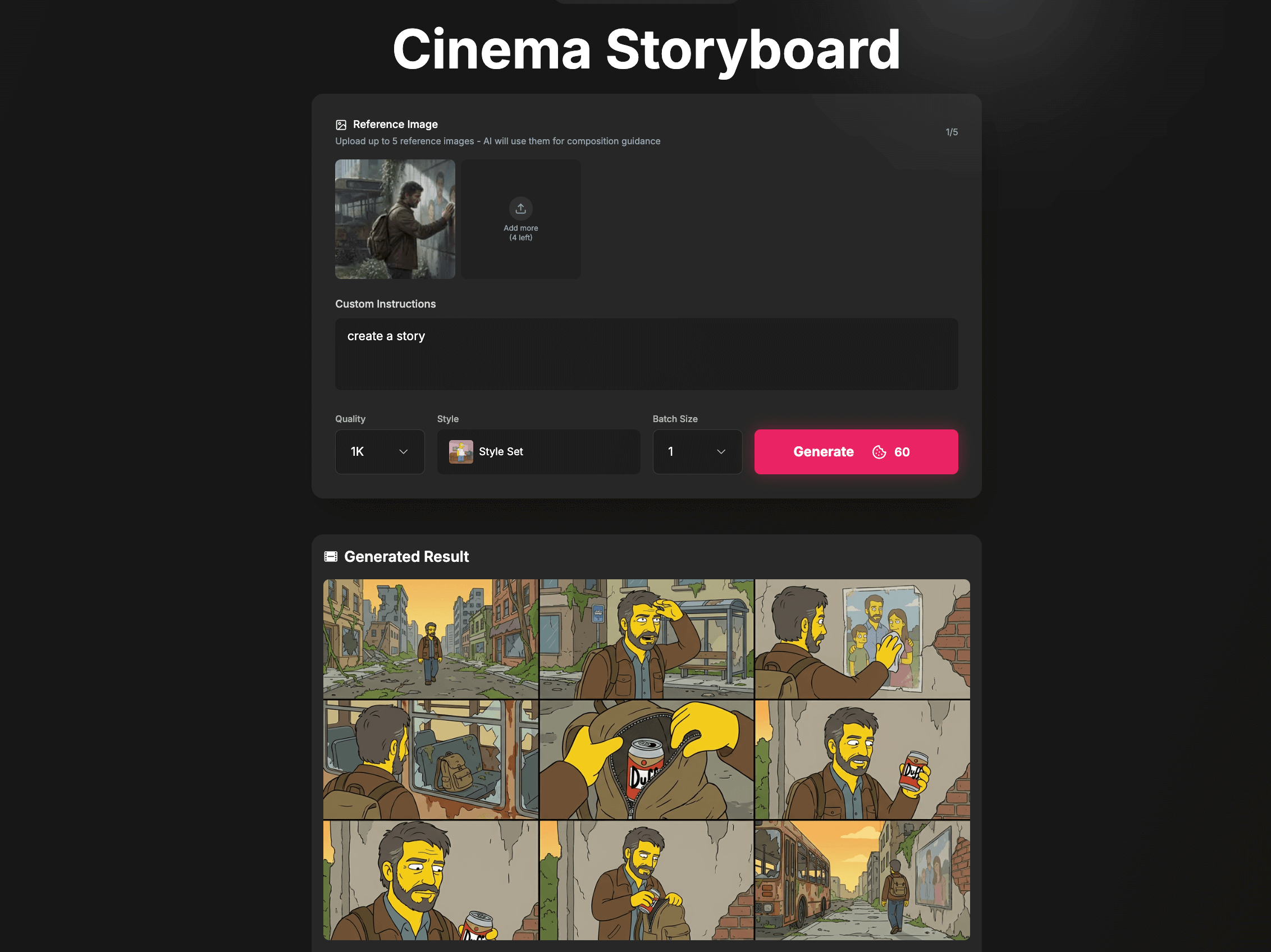
Step 2: Generate Storyboards with /cinematic-storyboard-generator
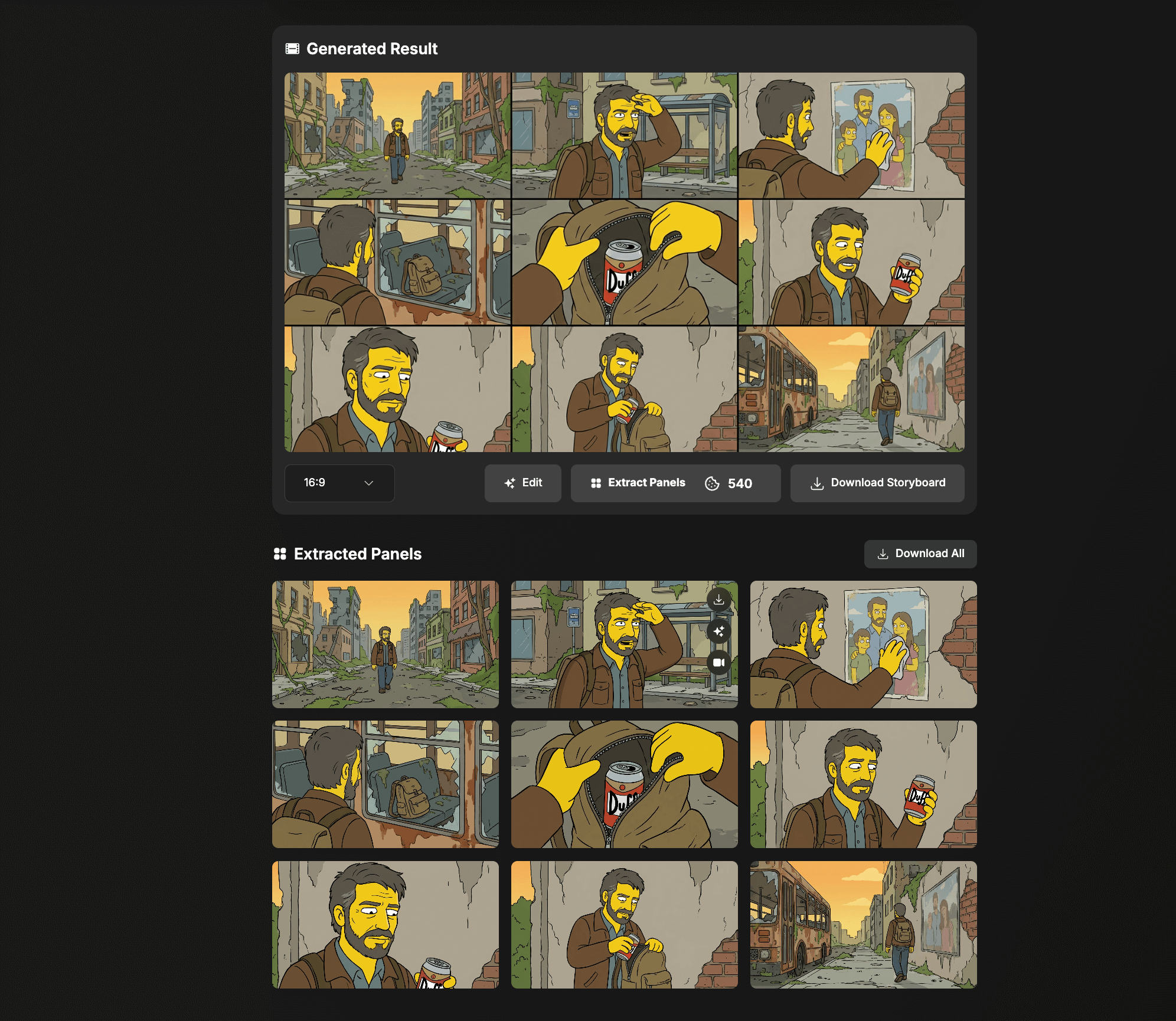
This is where everything comes together. The Cinematic Storyboard Generator takes your reference images and generates a complete sequence of frames that maintain style consistency throughout.
How to use it:
Just chat naturally:
"Generate a storyboard for a 30-second video about a character walking through a neon city at night. Use these reference images for the visual style."
Then upload your style references. The generator creates storyboard frames that all share the same visual language—consistent colors, lighting, and atmosphere.
What this solves:
- Scene-to-scene consistency: No more jarring style changes between shots
- Visual planning: See your entire video before committing to generation
- Quick iteration: Test different styles in minutes, not hours
- Better prompting: Storyboards help you refine what you actually want
I've found that spending 10 minutes on storyboards saves hours of re-generating videos that don't match.
Step 3: Use Agent Mode for Character Consistency
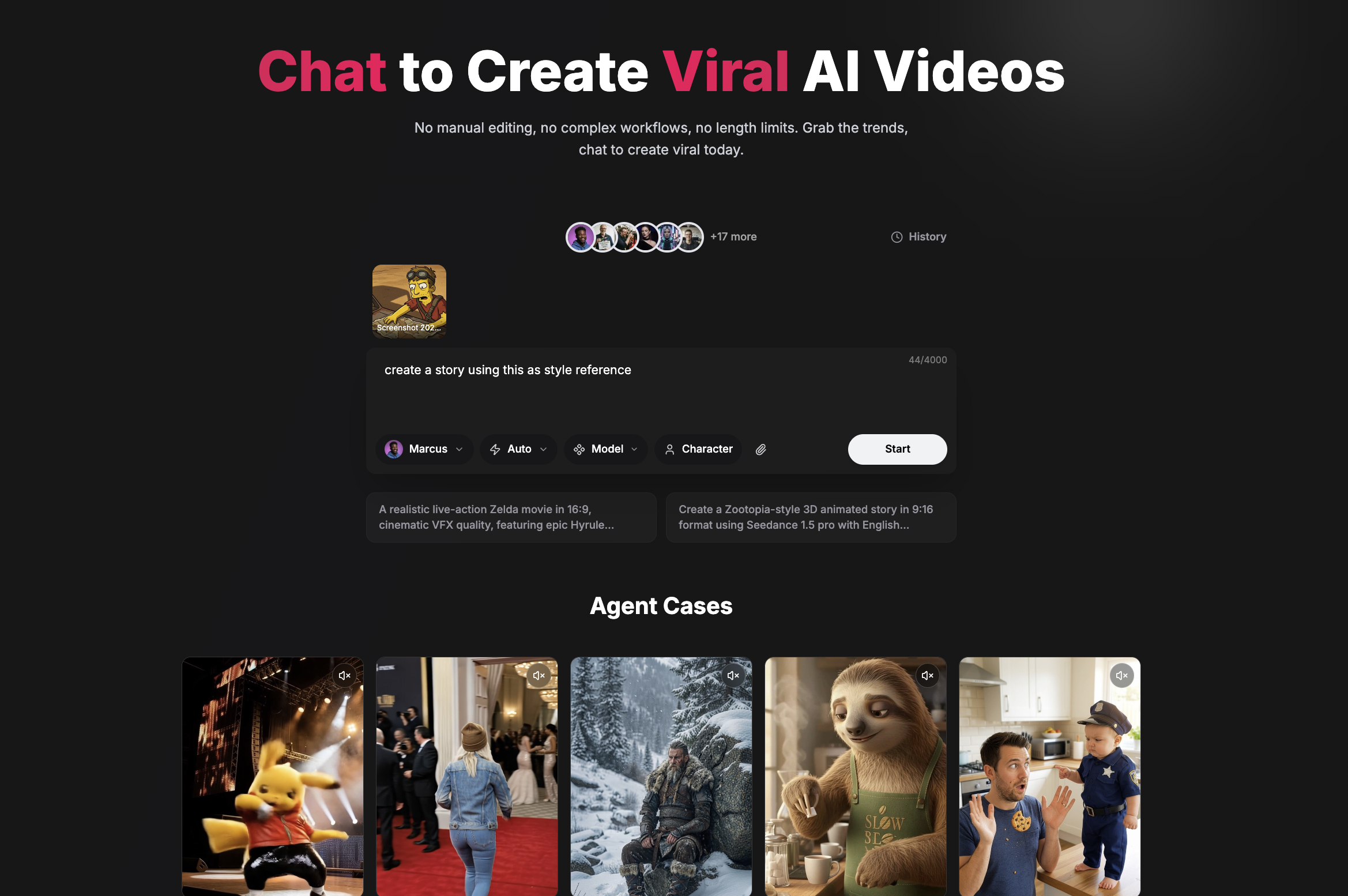
For videos with recurring characters, Agent Mode is essential. This feature lets you upload reference images for both style AND character appearance.
What you can reference in Agent Mode:
- Character face and appearance: Maintain the same person across all scenes
- Clothing and accessories: Keep outfits consistent
- Visual style: Apply the same color grading everywhere
- Environment design: Keep locations recognizable
How it works:
Upload your references through chat:
"Use this image as my character reference and this style reference for the visual look. Create a video of the character walking through a forest."
The AI agents work together to ensure every frame respects both your character and style references. It's like having a continuity supervisor checking every shot.
Step 4: Generate Your Final Video
With storyboards approved and references uploaded, generating the final video is simple. The style learning from your references carries through to video generation, creating cohesive content that looks intentionally crafted.
The result: Professional-looking AI videos where every scene shares the same visual identity—no more random AI outputs.
Real Example: Creating a Cinematic Short
Last week I created a 2-minute cinematic short using this exact workflow:
References used:
- 5 stills from Blade Runner 2049 (cyan/orange noir aesthetic)
- 1 character reference portrait
Process:
- Chatted with CloneViral to generate 12 storyboard frames
- Reviewed and adjusted composition for key scenes
- Uploaded character reference in Agent Mode
- Generated video segments
- Final result: Every scene maintained the moody, atmospheric quality
Without style references: Random lighting, inconsistent colors, character looked different in every shot.
With style references: Cohesive cinematic feel throughout, character maintained appearance, professional-grade output.

Best Practices for Style Reference Images
After months of testing, here's what actually works:
DO:
- Use high-resolution images: Low-quality references teach low-quality style
- Match aspect ratios: Vertical references for TikTok content, horizontal for YouTube
- Include lighting variety: Show the style in different conditions
- Pick a specific genre: Noir, anime, documentary—commit to one aesthetic
- Use 3-5 references: Enough for consistency, not so many that style gets diluted
DON'T:
- Mix incompatible styles: Cyberpunk + cottagecore = confused AI
- Use heavily watermarked images: Watermarks can bleed into outputs
- Ignore color consistency: References should share a color palette
- Forget about motion: Consider how your style translates to video movement
The Chat-Based Advantage
What makes CloneViral different is that everything happens through natural conversation. You don't need to learn complex software or understand technical parameters.
Traditional AI video workflow:
- Learn multiple tools
- Set technical parameters
- Write structured prompts
- Manually check consistency
- Re-do when things don't match
CloneViral chat workflow:
- Chat about what you want
- Upload your references
- Review and approve storyboards
- Generate video
- Done
The AI handles the technical complexity while you focus on creative decisions.
How to Master Advanced Stylization Techniques (Podcast Deep Dive)
Want to learn professional cinematography techniques for AI videos? We've created detailed podcast episodes covering color theory, camera movements, and advanced stylization strategies.
English Episode: How to Make Cinematic AI Videos Using Reference Images—Breaking down rack focus, color contrast ratios, compositional rules, and practical prompt templates you can copy today.
Japanese Episode (日本語): 参照画像を使ってシネマティックなAI動画を作る方法—アニメスタイルと実写映画スタイルの効果的な融合、日本の映画美学をAI動画に適用する実践的テクニック。
Both episodes include real-world examples and ready-to-use prompt templates for immediate results.
Quick Start: Your First Stylized Video
Ready to try this yourself? Here's the fastest path to your first professional-looking AI video:
-
Find your style: Screenshot 3-5 frames from a video or film that has your desired look
-
Open CloneViral and chat: Go to /cinematic-storyboard-generator and describe your video concept
-
Upload references: Add your style images and let Nano Banana learn the aesthetic
-
Review storyboards: Make sure the style transfers correctly to each frame
-
Generate video: Let the AI create content that actually matches your vision
For character-consistent content, start with /agent-mode and upload your character reference alongside style references.
Why This Matters for Your Content
The AI video space is crowded. Every creator has access to similar tools. What separates viral content from forgettable content isn't just ideas—it's execution quality.
Stylization through reference images gives you:
- Recognizable brand identity: Viewers remember consistent aesthetics
- Professional appearance: No more "random AI" vibes
- Faster iteration: Style decisions made upfront save time later
- Competitive edge: Most creators still don't use this technique
The secret isn't having better AI—it's giving AI better direction. Reference images are that direction.
Start Creating Better AI Videos Today
The difference between amateur and professional AI videos comes down to one thing: intentional style choices made before you generate.
- Choose your references carefully
- Use the Cinematic Storyboard Generator for planning
- Apply Agent Mode for character consistency
- Let the AI handle the technical work
Your first stylized video will look noticeably better. Your tenth will look professional. And it all starts with a simple chat.
Ready to transform your AI video quality? Start with CloneViral and see the difference stylization makes.
Premium AI Video Generation Experience
We support advanced AI video generation technology for viral content
Start Creating Now